


AI Stylist - Outfit Maker App
4.48.00 Reviews
App Specs
- Version
- 1.2.3
- Updated On
- License
- Free
- Downloads
- 10,000+
- Developer
- LeoStudio Global Ltd.
- Categories
- Beauty
- Platform
- Android
Screenshots
 Analysis by AppCompare
I start with a familiar problem: a closet full of clothes and no clear idea what to wear. A digital stylist sounds useful in that moment, but the value depends on whether it can turn the items I actually own into practical choices. AI Stylist - Outfit Maker is a beauty app from LeoStudio Global Ltd. that aims to help with that decision. I’d think of it less as a replacement for getting dressed and more as a way to make wardrobe planning feel less repetitive.
Before you begin, consider the effort involved
The app is free to download, with in-app purchases ranging from $2.99 to $69.99 per item. It has an Everyone content rating, a 4.4 average from around 744 ratings, and over 10,000 installs. Those figures give a sense of its reach, but they don’t tell you whether the styling approach will suit your taste. I’d judge that by how well you’re willing to set up your wardrobe and how much help you want choosing outfits.
The biggest practical question is whether you’ll take the time to add your clothes. If you only want a quick idea for today, documenting a wardrobe can feel like extra work before you get any benefit. If you often revisit the same pieces and struggle to combine them, that initial effort has a better chance of paying off. I’d start with the clothes you wear most, rather than trying to catalogue everything in one sitting.
A small wardrobe setup can make the advice more useful
When you add items, think of it as building a working selection, not creating a perfect inventory. Begin with dependable basics, a few pieces you enjoy wearing, and anything that tends to be hard to style. That mix gives outfit suggestions something useful to work with without turning setup into a weekend project. You can expand it later if the app becomes part of your routine.
This approach also helps you assess the recommendations fairly. If the closet contains only a couple of unrelated items, combinations may feel limited or odd; that doesn’t necessarily tell you much about the app’s value once it has a more representative selection. On the other hand, if you don’t want to photograph or organize clothes at all, a simple outfit-planning note or a quick browse through your own closet may be the easier choice.
Where it fits in an everyday routine
I can see the most useful moment being the night before a busy morning. Rather than standing in front of the closet while watching the clock, you can use the app to explore a few combinations from clothes you already have, then decide what feels right. That doesn’t require following every suggestion: treating the result as a starting point gives you room to account for comfort, plans, and the weather you’ll actually face.
For a trip, the same idea can help you think through a small set of clothes before packing. You could look for pieces that work in more than one combination and spot gaps while there’s still time to reconsider. I wouldn’t treat an AI-generated outfit as a packing guarantee, though. You still know better whether a fabric suits the climate, whether shoes are comfortable for a full day, and whether a look fits the event.
Worth Reading Before You Choose

Flipboard Shows What News Apps Must Do Beyond the Feed

Switching to Android Auto Means Rethinking Your Driving Routine

Google Calendar Makes a Crowded Week Easier to Manage

Ludo King Makes the Most of the Minutes Between Plans

Baby Panda World Brings Quick Play to Modern Phones, but Its Game Library Feels Busy

ESPN’s Live Game View Makes Following Close Games Easier
How I’d compare it with familiar alternatives
A basic wardrobe spreadsheet or notes app gives you control and avoids the chore of trying a new styling workflow, but it won’t offer the same kind of outfit suggestions. Browsing fashion images can spark ideas, yet those looks may rely on pieces you don’t own. The appeal here is the possibility of bridging that gap by connecting inspiration with your own wardrobe; the trade-off is the time it takes to enter clothes and the fact that automated suggestions can miss your personal boundaries.
If you want precise, human feedback on fit, tailoring, or what suits a particular event, advice from someone who knows your preferences may be more dependable. If your main goal is to shop less impulsively, first check whether recommendations actually help you use existing pieces; an attractive suggestion is not automatically a reason to buy something. I’d use any shopping prompt as a reason to pause and consider what role a new item would play, not as proof that it belongs in your closet.
For people who enjoy experimenting with combinations, the app may make getting dressed more playful. For someone who already has a reliable personal uniform, or who dislikes uploading and organizing wardrobe items, it may add unnecessary steps. That difference matters more than whether an app can produce a surprising outfit: a useful stylist should make your own routine easier, not turn it into another task.
The current version is 1.2.3 and requires Android 8.0 or later. Its free starting point makes it possible to try the basic experience before deciding whether paid items are worth considering. I’d check the purchase details in the app before committing, and I wouldn’t assume that every useful styling option is included at no cost. A sensible test is to use the free experience for a few outfit decisions and see whether it saves time or helps you wear something you might otherwise overlook.
What should you expect from the suggestions? I’d expect ideas to be most helpful when the wardrobe you add reflects what you really wear, and less convincing when your closet is incomplete or your preferences are very specific. Can it settle every question about occasion, comfort, or personal style? I wouldn’t rely on it for that. It can help generate possibilities, while the final call remains yours.
And is it better than simply asking a friend? That depends on what you need. The app offers a private way to explore combinations at your own pace; a friend may understand the context and your taste better. I’d use the app for quick brainstorming and turn to a trusted person when the choice has higher stakes or needs a human eye.
Ever had one of those days where you stand in front of your closet, feeling like you have absolutely nothing to wear? Yeah, me too. Enter AI Stylist - Outfit Maker. It's like having your own personal fashion guru right on your phone. Let me take you through my experience with this app that promises to transform your wardrobe game.
Getting Started with AI Stylist
First things first, downloading the AI Stylist - Outfit Maker app was a breeze. Available on both Android and iOS, you can grab it from the respective app stores. Once installed, the setup is pretty straightforward. The app asks you a few questions about your style preferences, favorite colors, and even your go-to fashion icons. I felt like I was crafting my own personal style profile, which was pretty cool.
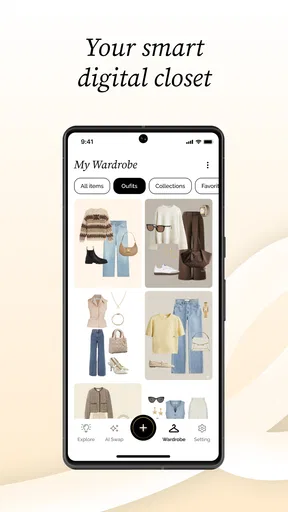
After setting up, the app gives you the option to upload pictures of your existing wardrobe. Now, I won’t lie, this took a bit of time. But once I had everything uploaded, the magic really started happening.
The Magic of AI Recommendations
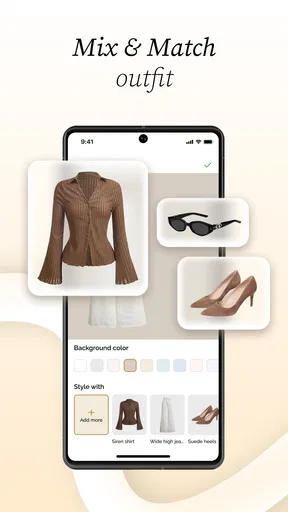
Here’s where the app shines. Using some sort of tech wizardry, the app analyzes your wardrobe and starts suggesting outfits. And let me tell you, some of these combos were things I’d never have thought of myself! The AI Stylist doesn't just throw random pieces together; it considers the occasion, weather, and even your mood (yeah, I was skeptical about that too, but it works!).
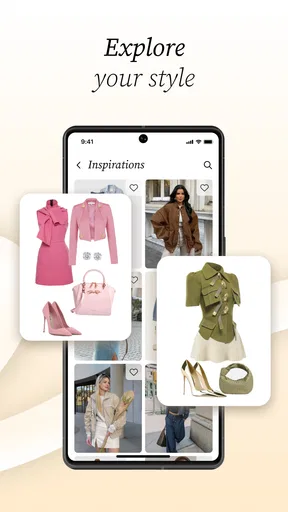
One of the standout features is the “Inspiration” section. If you’re like me and love scrolling through fashion blogs or Instagram for outfit ideas, this feature is a game-changer. The app curates looks from fashion influencers and allows you to recreate them with your own clothes. No more endless scrolling—everything you need is right there.
Shopping Made Smarter
Okay, confession time: I love shopping, but I tend to buy pieces that don’t always work with what I already own. The app's “Shop” feature is a lifesaver. It suggests items that would complement your existing wardrobe. Plus, it ensures that you’re not just impulse-buying, but making thoughtful additions to your style arsenal.
The app partners with various brands, so you can shop directly from it. I found myself adding a few items to my wishlist, knowing they’d perfectly fit into my wardrobe puzzle.
Social Sharing and Community
One of the unexpected delights of the app was its community feature. You can share your outfits and get feedback from other users. It’s a little like having a group of fashion-savvy friends at your fingertips. The feedback is generally positive and constructive, which is a nice touch.
I also found the fashion challenges fun. They’re like prompts that encourage you to try new styles. Whether it’s “Mix Patterns Day” or “Retro Revival,” it’s a fun way to step out of your comfort zone and experiment.
What’s the Catch?
While the app is mostly free, there are premium features that require a subscription. These include more personalized styling tips and exclusive access to certain fashion events. I tried the free version, and it was more than sufficient for my needs, but if you’re a hardcore fashionista, the premium version might be worth it.
The only downside? Sometimes the AI suggestions can be a bit quirky. I got a few recommendations that were more avant-garde than I’d personally wear, but hey, fashion is all about expression, right?
Who will get the most out of it?
I’d recommend it most to someone who likes clothes but gets stuck repeating the same combinations. The useful outcome isn’t necessarily a dramatic makeover; it may simply be noticing that a top works with a skirt you rarely reach for, or finding a fresh way to wear a familiar jacket. People who enjoy testing looks and sharing ideas may also get more from its inspiration, community, and challenge elements than someone who wants a strictly private checklist.
It may be a poor fit if you prefer to keep a minimal wardrobe, don’t want to photograph your clothes, or already know exactly what you like to wear. There’s no need to turn getting dressed into a project. I’d also be cautious about treating community reactions as a reliable measure of whether an outfit suits you. Feedback can be encouraging, but comfort and context are personal.
Make the shopping handoff deliberate
The handoff from an outfit idea to a purchase is where I’d slow down. A suggested item can look like the missing piece, but I’d ask whether it works with several things I own, whether I would wear it in my ordinary week, and whether I already have something that fills the same role. That quick check keeps a styling tool from becoming just another shopping feed.
The same goes for inspiration images. I’d use them to notice a color pairing, silhouette, or layering idea, then recreate only the part that makes sense with my clothes. Copying a whole look is rarely necessary. This small translation step makes the app more useful and helps keep the result personal rather than costume-like.
How to judge whether it earns a place on your phone
After trying it, I’d ask two simple questions: did it help me make a decision faster, and did it give me an idea I would actually wear? If the answer is yes, keeping a modest, representative wardrobe in the app may be worthwhile. If suggestions regularly feel impractical, or setup outweighs the benefit, it’s reasonable to stop there rather than paying for more.
There’s also a balance between novelty and reliability. A surprising combination can be fun, but a dependable outfit for a workday or an important appointment needs to feel right in real life, not just look interesting on a screen. I’d save experimentation for low-pressure plans and use my own judgement for dress codes, weather changes, and long days on my feet.
Overall, AI Stylist - Outfit Maker is a fantastic tool for anyone looking to elevate their style without breaking the bank or spending hours in front of the closet. It’s like having a stylist in your pocket, always ready to help you put your best foot forward. Give it a try, and you might just find yourself looking at your wardrobe in a whole new light.
Pros
- Easy to use interface for all users.
- Wide variety of clothing styles available.
- AI suggestions are highly personalized.
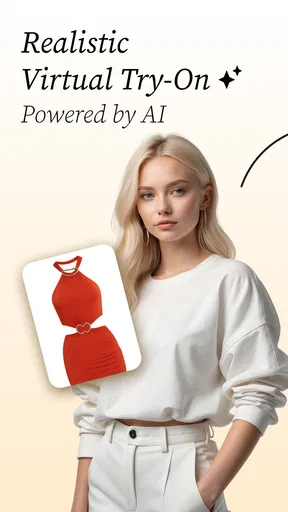
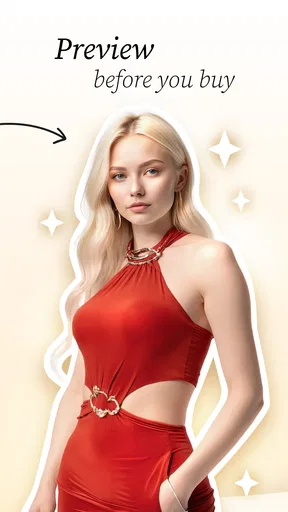
- Includes virtual try-on feature.
- Frequent updates with new trends.
Cons
- Requires a stable internet connection.
- Limited free features; many are premium.
- Slow loading times on older devices.
- Occasional inaccuracies in style matches.
- Lacks integration with popular shopping apps.
FAQs for AI Stylist - Outfit Maker App
What is AI Stylist - Outfit Maker App?
AI Stylist - Outfit Maker App is a cutting-edge application designed to help users create stylish outfits using AI technology. It offers personalized fashion recommendations based on your wardrobe, style preferences, and the latest trends. The app also suggests outfit combinations and allows you to try different looks virtually.
Is AI Stylist - Outfit Maker App free to use?
AI Stylist offers a free version with basic features, allowing users to explore its outfit suggestions and styling tools. However, for access to premium features, such as exclusive fashion tips and personalized consultations, users may need to subscribe to a paid plan. Prices and plans vary, so check the app store for details.
How does AI Stylist access my wardrobe?
The app allows users to upload photos of their clothing items to create a digital wardrobe. It uses AI to categorize and style these items into outfits. Users can also integrate the app with their favorite online shopping platforms to automatically update their virtual closet with new purchases.
Can AI Stylist - Outfit Maker App work offline?
While some basic features of AI Stylist might be accessible offline, such as viewing saved outfits, the app’s full functionality requires an internet connection. This ensures access to the latest fashion trends, real-time updates, and personalized recommendations. Make sure you have a stable connection for the best experience.
What devices are compatible with AI Stylist - Outfit Maker App?
AI Stylist is compatible with both Android and iOS devices, ensuring a wide range of users can enjoy its features. It supports most smartphones and tablets with recent operating systems. Check the app store for specific device requirements to ensure compatibility before downloading the app.


